
The AGENT Kit / Start Here
You know AI can help. This is where to start.
Stop guessing. Find your real candidates. Build the few that move the needle. Prove it worked.
It is not the tools
Here is where most people are. You can see that AI could take real work off your plate. The tools are ready, the moment is right, and you want to bring it into how you actually run things. The only open question is where to point it first, and that is the one nobody answers for you.
So here is the honest truth. The hard part was never the tools. It is knowing what to build first.
Aim at the wrong starting point and even a great tool underwhelms, because the loud task gets the attention while the quietly expensive one keeps costing you. Aim at the right one and the same tools and the same effort pay off completely. That is the whole difference, and it is entirely within your reach.
Getting that decision right is what this kit is built for. Not which tool to use. What to build first.
What this kit does
This kit does one thing. It gets you to the right first build, then walks you through making it real.
By the end you will have:
- A map of the work you have stopped noticing, the repetitive load you carry without counting it.
- A ranked shortlist of automation candidates, scored by value against effort, so the order is decided by math and not by mood.
- Build guidance and ready-to-use prompts for the handful of automations worth your time.
- A way to roll them out without breaking the business, and a way to prove they worked.
Stop guessing. Find your real candidates. Build the few that move the needle. Prove it worked. That is the whole promise.
The honest part
One promise this kit will keep: not everything you find is yours to build.
Some of what surfaces will be a clean afternoon project. You run a prompt, wire one connection, reclaim an hour a week. Do those yourself. That is exactly what this is for.
Some of what surfaces will be high value and genuinely hard. The kind of build where the cost of getting it wrong is higher than the cost of paying someone who has gotten it right before. This kit will name those when it sees them, and it will tell you to stop. That is not a sales tactic. It is the same call I would make sitting across from a client. Knowing the difference between a do-it-yourself win and a hand-it-off project is part of what you came here to learn.
You are not being sold a reason to hire anyone. You are being handed a way to tell the two apart.
The hard part was never the tools. It is knowing what to build first.
How it works
The kit follows the AGENT framework. Five steps, in order, because the order is the point.
| Step | What it does |
|---|---|
| Audit | See the work you have stopped noticing. |
| Gauge | Rank what you found by value against effort. The step almost everyone skips, and the one that makes the difference between a build that pays off and one that just runs. |
| Engineer | Build the few candidates that earned their place. |
| Navigate | Roll them out without breaking what already works. |
| Track | Prove it worked, or learn fast that it did not. |
Work them in sequence the first time through. Audit feeds Gauge. Gauge decides what Engineer touches. Skip ahead and you are back to building the loud thing first.
How to use this
Block ninety minutes for your first pass. You will not finish a full build in one sitting, and you should not try. The goal of pass one is a ranked shortlist and a clear decision about what to build first.
Have these open: your calendar from the last two weeks, your inbox, and whatever tool runs your day to day. The audit pulls from real recent weeks, not from memory.
Work in order, and do the worksheets as you go, not after. A worksheet you mean to fill in later is a worksheet you will not fill in.
When you reach a build, start small and reversible. Navigate will keep you honest about that.
The AGENT Kit / A / Audit
See the work you have stopped noticing
Capture everything. Judge nothing. Leave ranking for the next step.
Why you cannot see your own work
The tasks worth automating are almost never the ones on your mind. They are the ones that left your mind years ago.
When you do something every week, your brain stops filing it as work. It becomes a reflex, like locking the door on your way out. You do not decide to do it. You do not time it. You do not count it. And because you cannot see it, you never put it on the list of things a machine could carry for you.
This is why you reach for the dramatic task. The dramatic task is visible. It made you angry recently, so it feels urgent and important. Meanwhile the fifteen-minute thing you do nine times a week sits in your blind spot, quietly costing you more than the dramatic task ever did.
Audit is one job: drag the invisible work into the light so you can count it. You are not solving anything yet. You are taking inventory.
One rule: capture now, judge later
The fastest way to ruin an audit is to evaluate while you collect.
You will write down a task and immediately think, "that one is not worth automating," and leave it off. Do not do that. You do not yet know what it is worth, because you have not measured it and you have not compared it to anything. A task that feels trivial in isolation can top the list once you see it costs you four hours a month.
So the rule for this step is simple. Capture everything. Judge nothing. Ranking is the next step, and it has its own tools. If you filter now, you filter blind, and the loud task wins by default. Again.
Write down the boring ones. Write down the ones you are slightly embarrassed to still be doing by hand. Especially those.
Do not audit from memory
Memory is the worst possible source for this. It over-remembers the recent and the dramatic, and it forgets the constant. Ask yourself "what eats my week" cold, and you will name three things and miss twenty.
Pull from the record instead. Open these before you start:
- Your calendar, last two weeks. Recurring blocks and meetings are repeatable work hiding in plain sight.
- Your sent mail, last two weeks. The emails you write again and again are templates you have not built yet.
- Wherever your tasks and to-dos live. The things you carry from one day's list to the next.
- Wherever money moves. Invoices, payments, follow-ups on both. Repetitive and high-stakes is a strong signal.
Two weeks is enough to catch the weekly rhythm without drowning you. Work from what these show you, not from what you can recall.
What you are looking for
A good automation candidate has a shape. The more of these it has, the better the candidate:
- It repeats. Daily, weekly, every time a new client signs. If it happens once a year, leave it.
- It has a trigger. Something predictable starts it. A form gets filled. A call ends. A date arrives.
- It is more rote than judgment. The steps are mostly the same each time. You are following a pattern, not making a hard call.
- It costs real time. Either a long task or a short task you do constantly. Both add up.
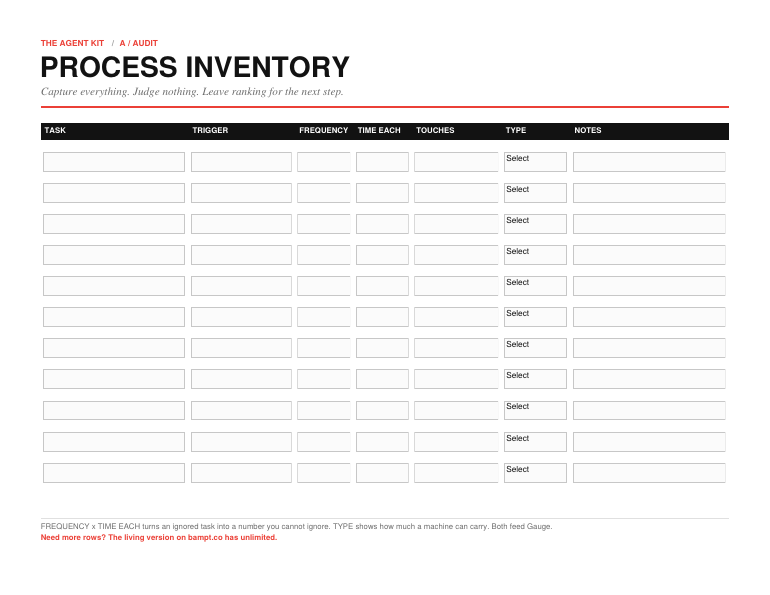
As you capture each task, record a few facts about it: what the task is in plain words, what triggers it, how often it happens, how long it takes each time, what tools or people it touches, and whether it is rote or judgment-heavy. Frequency times time-per-instance is what turns a task you ignore into a number you cannot. You are quietly assembling the raw material for the next step while you think you are just making a list.
Where the work hides
If you are staring at a blank page, sweep these areas one at a time. You will find candidates in nearly every one of them.
- Communication. Replies you send over and over. The same answer to the same question. Status updates. Reminders.
- Scheduling. Booking, rescheduling, confirming, the back-and-forth to find a time.
- Intake and onboarding. Everything that happens between "yes" and "started." Forms, welcome notes, gathering information, setting people up.
- Moving data between tools. Copying from one place to another by hand. If you are the integration between two apps, write it down.
- Reporting. Pulling the same numbers into the same summary on the same cadence.
- Follow-up. The second touch, the nudge, the "just checking in" you keep meaning to send and sometimes forget.
- Content and admin. Repurposing, formatting, filing, the small repeated upkeep that keeps the lights on.
Do not stop at one per category. The goal is a wide, messy, complete list. You will tighten it later.
The worksheet: Process Inventory
This is the worksheet for the whole step. One row per task. Fill it as you sweep, and keep adding rows until you run out of work to confess. Leave the ranking blank. You are not scoring yet. You are only seeing.
The Week Interview
A blank worksheet is intimidating. It is easier to answer questions than to invent a list from nothing. So let an AI assistant interview you, then turn its output into rows. Run these in order. Copy what comes back into your Process Inventory.
The walkthrough
Interviews you through a normal week and surfaces the repeated work you would not have listed on your own.
You are an operations analyst helping me find repetitive work in my
business that could be automated. Interview me one question at a time.
Do not move on until I answer.

Walk me through a typical week, one day at a time. For each day, ask
what I did, then ask one follow-up that probes for anything I do
repeatedly, on a schedule, or the same way every time. Watch for tasks
I describe as "just," "quick," or "I always," those are usually
invisible repetitive work.

When we finish the week, give me a table of every repeatable task you
heard, with these columns: task, what triggers it, how often, rough
time each, what tools or info it touches, and whether it is mostly
rote or mostly judgment. Do not skip the small ones.
The sent-mail read
Clusters the messages you send over and over into templatable types.
I am going to describe or paste the kinds of emails and messages I
have sent in the last two weeks. Group them into repeatable types.

For each type, tell me: what triggers me to send it, how often I
likely send it, how much of it is the same every time versus genuinely
custom, and whether it is a strong candidate for a saved template or a
draft an assistant could write for me. Flag the three most repetitive
types first.

Here is what I send: [describe your recent sent mail, or paste subject
lines]
The twice test
A fast pass to catch rote work the walkthrough missed.
Ask me these four questions one at a time and wait for each answer:

1. What did I do more than twice this week?
2. What did I explain to someone that I have explained before?
3. What did I copy or re-type from one place into another?
4. What did I almost forget to do, then scramble to finish?

After my answers, list each item as a possible automation candidate
with a one-line reason it qualifies. Keep it short.
A note on the interview: the AI is jogging your memory, not deciding anything. Take its list, sanity-check it against your calendar and sent mail, and add the rows it earned to your inventory. Delete nothing yet.
When you are done
You have done this step right when your Process Inventory feels slightly too long and slightly embarrassing. A short, tidy list means you filtered while you collected, and you missed things.
You are not looking for the answer here. You are looking for the full field of candidates. The answer comes next, when you rank them. Take your full, messy inventory into the next step.
The AGENT Kit / G / Gauge
Rank before you build
This is the step that decides everything. Same effort, same tools, completely different outcome, set entirely by what you point that effort at.
Why ranking is the whole game
Building is the easy part now. That is the thing almost nobody has caught up to. The tools got good enough that wiring up an automation is no longer the hard skill. Choosing the right one is.
So winning here is not about being the best builder. It is about building the right thing first.
This is the step do-it-yourselfers tend to skip, and it is easy to see why. Ranking feels like delay and building feels like progress. Sitting with a list and scoring it is boring. Opening a tool and making something move feels like winning. So the boring step gets skipped, the easiest task to start becomes the one that gets built, and that gets called strategy.
It was not strategy. It was momentum pointed at the nearest target.
Gauge is where you refuse to do that. You take the messy inventory from the last step and you force every item to answer two questions before any of them earns your time. Get this step right and the rest of this kit is execution. Get it wrong and you will build beautifully, in the wrong direction.
Building is the easy part now. Choosing the right one is the whole game.
The loud task trap
Here is the mistake, named so you can catch yourself making it.
You will be drawn to the loud task. The loud task is the one that blew up last week. The angry client, the report that was late, the thing that made you say "there has to be a better way" out loud. It is emotional, recent, and vivid, so it feels important.
Loud is not the same as valuable. The loud task is often a one-off, or rare, or genuinely needs your judgment and should not be handed to a machine at all. Meanwhile the quiet task, the fifteen-minute thing you do nine times a week without noticing, sits there returning nothing to your attention and quietly outweighing the loud one on every measure that matters.
Drama is a terrible ranking signal. The whole point of scoring is to replace "what is bothering me right now" with "what truly pays." You already did the hard part by writing the quiet tasks down in the audit. Do not let the loud one elbow back to the front of the line now.
Two questions, two axes
Every candidate gets scored on two things, and only two. Keep it this simple on purpose.
Value: what does fixing this return? It is built from two inputs you already captured:
- Time back. Frequency times time-each. A task you do six times a month at fifteen minutes is ninety minutes back, every month, forever. It is the single most clarifying number in the whole kit, and the one your gut gets most wrong.
- Stakes. What the status quo costs beyond time. Errors, missed revenue, annoyed clients, drain that bleeds into everything else. A task can be low-time and still high-value if getting it wrong is expensive.
Effort: what will it cost to build and keep alive? Also built from what you captured:
- Touches. How many tools, systems, and pieces of information it spans. One tool is easy. Five systems that have to talk to each other is a project.
- Judgment. How much is a real decision versus a repeatable pattern. Rote is cheap and safe to automate. Judgment-heavy work is harder, riskier, and often should stay partly human. Calling judgment work "rote" is how people automate the thing that needed them and break it.
- Fragility. How often the inputs change, and how bad it is when the thing fails quietly. Some automations need babysitting. That is ongoing effort, not a one-time cost.
Score each task from 1 to 5 on Value, and 1 to 5 on Effort. You are not aiming for precision. You are aiming to separate the 4s and 5s from the 1s and 2s. That separation is the entire decision.
The map
Plot every task by its two scores and it lands in one of four zones. Memorize these. This is the core of the whole kit.
Start Here
High value, low effort. Your best money. Real return, cheap to build, low risk if it breaks. Build these yourself, this week, in order of value.
The Prize
High value, high effort. The biggest returns live here, and so does the place most do-it-yourself efforts quietly die.
Later
Low value, low effort. Fine to grab on a slow afternoon. Never ahead of a Start Here item.
Leave It
Low value, high effort. The trap, and usually where the loud task lands once you score it honestly. Walk away, and feel good about it.
How to score, and how to rank
Work down your inventory and give each row a Value and an Effort score. Use the anchors. Value 1 saves a little time and nothing breaks if you ignore it. Value 5 saves real time every week and reduces a real risk or revenue leak. Effort 1 is one tool, fully rote, an afternoon. Effort 5 is many systems, real judgment, and ongoing care to keep it from drifting.
Then rank. The rule is simple. Sort by Value, highest first. Break ties by Effort, lowest first. The task at the top of that sorted list, sitting in Start Here, is what you build first. Not the loud one. Not the fun one. That one.
One honest caution while you score. When a task is judgment-heavy, that judgment is usually the part with your name on it, the part clients pay you for. The move there is rarely to automate the whole thing. It is to automate the formatting, the gathering, the first draft, and keep the decision yours. Score those tasks with that in mind, and your Effort number will tell the truth.
The honest line
Look at everything you scored into The Prize. High value, high effort. These are real, and they are tempting, and you should be careful with them.
Some of them you can build yourself if you are willing to spend the weekends. Some of them you should not. The honest test is this: when the cost of getting it wrong is higher than the cost of paying someone who has built it before, that is not a do-it-yourself project anymore. That is a hire.
I am not saying that to sell you anything. It is the exact call I would make sitting across from a client, and I make it against my own interest all the time by telling people to keep something in-house. The reason this kit can be trusted on the easy builds is that it is honest about the hard ones. Knowing which of your prizes is a weekend and which is a hire is part of what you came here to learn.
Mark them. You do not have to decide today. You just have to stop pretending the hard ones are the same as the easy ones.
The worksheet: Scoring Template
Carry every row from your Process Inventory into this. Compute Time Back, score Value and Effort, read the quadrant off the map, then rank. Fill Time Back as frequency times time-each in hours per month, and do the math even when it feels obvious. Score Value on time back plus stakes, and Effort on touches plus judgment plus fragility. When in doubt, score Effort higher, not lower. Builds are always harder than they look. Then rank only your Start Here items by value. The Prize items get a note, weekend or hire, not a number.
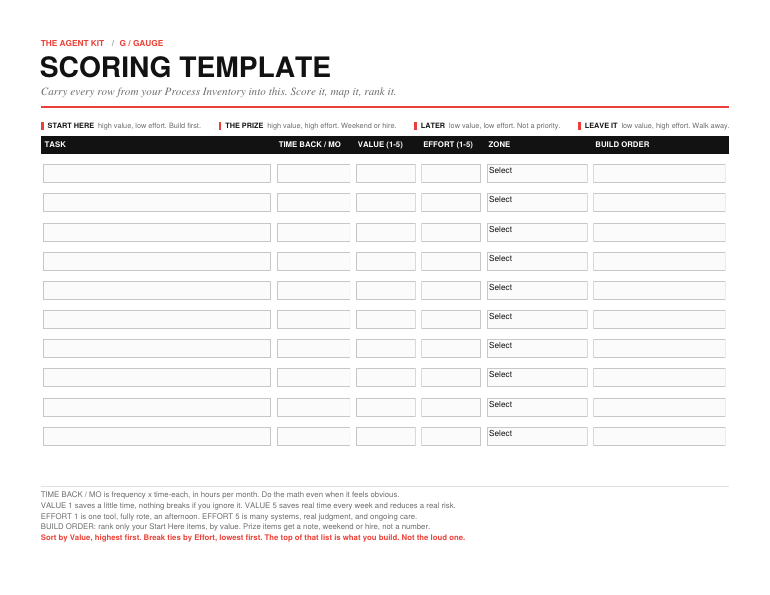
The math is the point. A task you would have ignored on instinct will sometimes post the highest Time Back number on the page, and the page does not care how you feel about it.
Pressure-test your ranking
Scoring yourself is hard because you are too close to the work. Let an assistant pressure-test your numbers. Take its scores as a second opinion, not a verdict. You know your stakes better than it does. But if it and you disagree on a number, that disagreement is worth a hard look. It is usually catching an emotion you did not know was steering.
Pressure-test my ranking
Proposes Value and Effort scores for your candidates, flags the ones that are probably a hire, and challenges any score that looks driven by emotion instead of math.
You are helping me rank automation candidates by value and effort so I
build the right one first. I will paste a list of tasks. For each, I
will give you how often it happens, how long it takes each time, how
many tools or systems it touches, and whether it is mostly rote or
mostly judgment.

For each task:
1. Calculate time back per month (frequency x time each).
2. Propose a Value score 1-5 (time back plus stakes) and an Effort
   score 1-5 (touches plus judgment plus fragility). Explain each in
   one line.
3. Place it in a quadrant: Start Here (high value, low effort),
   The Prize (high value, high effort), Later (low value, low effort),
   or Leave It (low value, high effort).
4. Flag any judgment-heavy task where automating the whole thing would
   be risky, and tell me which part to keep human.

Then give me a ranked build order for the Start Here tasks only, and a
short list of which Prize tasks look like a hire rather than a weekend.
Push back on any task where my instinct seems louder than the numbers.

Here are my tasks: [paste your inventory rows]
When you are done
You have done this step right when you have a ranked shortlist and one task circled at the top, and when at least one item you were emotionally attached to has been honestly parked in Later or Leave It. If nothing got demoted, instinct is probably still steering a little. Worth one more pass with the math.
You should also have a small, marked pile in The Prize, the high-value builds you have flagged as weekend-or-hire but have not committed to yet.
Take the task at the top of your Start Here list into the next step. That is the one you build. Everything Engineer teaches you, you are about to aim at that single, correctly chosen target.
The AGENT Kit / E / Engineer
Build the few that earned their place
You have a ranked list and one task circled at the top of Start Here. That circled task is the only thing you build right now. Not the next three. One.
This is the part you wanted to start with, and the reason it works now is that you did not start with it. You are aiming a real skill at a correctly chosen target. Most do-it-yourself automation fails one step earlier than this. Yours will not, because you already did the hard thinking.
Engineer is the longest part of this kit, and most of it is one idea repeated. Every automation has the same skeleton. Once you can see the skeleton, you can build almost anything. The four examples at the end are just that skeleton wearing four different outfits.
The shape of every automation
Strip any automation down and it is the same five parts. Learn these once and you stop needing a tutorial for every new task.
- Trigger. The thing that starts it. A form gets submitted. A date arrives. An email lands. You already named this in your audit.
- Input. What it needs to do the job, and where that comes from. A name, an order, a file, a previous message.
- Steps. The repeatable logic. The part you could write on an index card and hand to a new hire. If you cannot write it down, it is not ready to build.
- Output. What it produces. A drafted reply, a booked slot, a cleaned list, a routed lead.
- Checkpoint. Where a human looks before the output counts. At first this is you, every time. Later it is you, sometimes. The checkpoint is not optional.
Every prompt and every build in this section is just these five parts, filled in. When a build confuses you, come back here and ask which of the five is unclear. It is almost always the Steps, because the Steps were never written down.
Write the recipe first
Here is the highest-leverage move in the entire build, and the one people skip hardest.
Before you automate a task, write it out as a recipe. Plain steps, in order, the way you would teach someone on their first day. "When this happens, I open that, I check the other thing, if it is one way I do this, if it is another way I do that, then I send it on." Boring. Specific. Complete.
If you cannot write the recipe, you cannot automate the task, and that is useful information, not a setback. A task you cannot describe in steps is either still fuzzy in your own head, or it is judgment work pretending to be routine. Either way, the recipe is where you find that out. On paper, for free, before you have sunk a weekend into building the wrong thing.
The recipe is also the thing you hand to the AI. A clear recipe is most of a working automation. A vague one is most of a broken one.
The recipe writer
Interviews you and turns a task you do by hand into a clear written recipe, with the judgment steps marked so you know what not to fully automate.
You are helping me turn a task I do manually into a clear written
recipe so I can automate it. Interview me one question at a time. Do
not write the recipe until you have what you need.

Ask me, in turn: what starts this task, what information I need and
where it comes from, every step I take in order, the points where I
make a real judgment call, what the finished result looks like, and
where it goes next.

When you have enough, write the task back to me as a numbered recipe a
new hire could follow on day one. Mark any step that involves a real
judgment call with [HUMAN] so I know which parts should stay with me.
Keep it concrete. If a step is vague, ask me to make it specific
instead of guessing.
Build small, build reversible
Do not build the dream version. Build the smallest version that does one useful thing, end to end.
The dream version has nine features and breaks in nine places, and you cannot tell which. The small version does one thing, and when it works you know exactly why. You add the second thing only after the first is trusted. This is slower for about a week and faster for the rest of time.
Two rules for the first build:
- Keep yourself in the loop. The first version drafts, it does not send. It suggests, it does not decide. You are the checkpoint, every single time, until it has earned more.
- Keep it reversible. You must be able to switch it off and do the task by hand tomorrow. Do not dismantle the manual way yet. Reversibility is what lets you experiment without betting the business.
The four durable builds
Four automations show up in nearly every business, and unlike the trendy ones, they do not rot. The tools under them will change. The pattern will not. Here is each one as the five-part skeleton, where to keep a human, and a prompt to start.
Intake
What it is: everything that happens when new information or a new person arrives. A lead fills a form, a client says yes, a request comes in.
The pattern: the Trigger is the arrival. The Input is the raw, messy thing they gave you. The Steps standardize it into the same fields every time and route it to the right place. The Output is a clean, structured record plus a confirmation to the person. The Checkpoint is you scanning for the ones that do not fit.
Keep human: anything that does not match the standard shape. Build the automation to flag those, not to guess at them.
Design my intake
Turns messy incoming information into the same clean record every time, with rules for what to flag instead of process.
Help me design an intake process for what arrives in my business:
[describe it, for example leads, client requests, orders].

Give me: the exact fields I should capture every time, a short set of
questions or form prompts that collect them, simple rules for routing
each item to the right place or person, and a confirmation message to
send back. Then list the cases that should be flagged for me to handle
by hand instead of processed automatically. Keep the rules in plain
language, not tied to any specific tool.
Scheduling
What it is: booking, confirming, reminding, and handling the reschedules and no-shows.
The pattern: the Trigger is a request or a booking. The Steps apply your real availability rules and send confirmations and reminders on a set cadence. The Output is a confirmed slot and a person who shows up. The Checkpoint is the exceptions, the odd request, the double-book.
Keep human: who gets your time and on what terms. Automate the logistics, not the gatekeeping.
Design my scheduling flow
Builds the booking, confirmation, reminder, and no-show logic from your real rules, and separates out what you should still handle yourself.
Help me design a scheduling flow. Here are my real rules: [your
availability, buffer times, who can book what, anything off-limits].

Give me: the logic for offering and confirming a slot under those
rules, a confirmation message, a reminder sequence with timing, and
clear handling for reschedules and no-shows. Then list the exceptions
I should keep for myself rather than automate, like VIPs or unusual
requests. Describe it as a process, not as steps inside a particular
app.
Email and message drafting
What it is: the replies you write again and again with small changes. The follow-up, the FAQ answer, the status update, the first draft of the proposal note.
The pattern: the Trigger is the situation that calls for the message. The Input is the specifics of this one. The Steps apply your voice and your rules to draft it. The Output is a draft, ready for your eyes. The Checkpoint is you, reading before it sends. This one stays in draft-not-send mode the longest, because your voice and your name are on it.
Keep human: send. For a long time, maybe always, you press send. The win is not sending automatically. The win is never starting from a blank page.
Build my drafting brief
Captures your voice and rules into a reusable brief an assistant uses to draft a repeated message type, so you only ever edit, never start cold.
Help me build a reusable brief that you will use to draft a specific
kind of message for me, so I never start from a blank page. The
message type is [describe it, for example a follow-up, an FAQ reply, a
proposal intro].

First, interview me about my voice and rules: tone, what I always
include, what I never say, length, and how I open and close. Then
write a brief that captures all of it. Finally, show me a draft using
a sample situation I give you. I review and edit every draft before it
sends, so optimize for a strong first draft, not a finished one.
Data cleanup and movement
What it is: the tidying, formatting, deduping, and moving of information from one place to another that you currently do by hand.
The pattern: the Trigger is new or messy data. The Steps apply fixed rules, standardize formats, catch the obvious errors, and move it where it belongs. The Output is clean, consistent, correctly placed data. The Checkpoint is a spot-check, plus a hard stop on anything the rules cannot confidently handle.
Keep human: the calls the rules cannot make. A cleanup automation should be loud about what it was unsure of, not silently guess and move on.
Write my cleanup rules
Produces a repeatable cleanup specification, including an explicit list of what the automation should refuse to guess and surface for you instead.
Help me write a repeatable set of rules for cleaning up [describe the
data, for example a contact list, a spreadsheet, incoming records].

Give me: the standard format each field should end up in, rules for
catching and fixing common errors, how to spot and handle duplicates,
and what counts as a value the rules should not touch but flag for me
instead. Write it as a clear specification I could apply the same way
every time. Tell me explicitly what the cleanup should refuse to guess
at and surface for a human.
When a build fights you
If a build is genuinely hard, it is almost always one of three things, and none of them is "you are not technical enough."
- The recipe was vague. You could not write the steps cleanly, so the AI cannot follow them cleanly. Go back to the recipe. This is the cause nine times out of ten.
- The task needed judgment. You are trying to automate a decision that is really yours to make. Pull the judgment back to a checkpoint and automate the parts around it.
- You built v3 first. You skipped the small version and reached for the dream. Cut it back to one useful thing and get that working alone.
And the honest one. If a build keeps fighting you and it came out of The Prize, high value and high effort, that is the signal you flagged back in Gauge. Fighting a high-stakes build for a third weekend is not grit. It is the moment the math said to call someone. There is no shame in it. It is the call I would make.
When you are done
You have one automation that works, that drafts or suggests rather than decides, and that you can switch off and do by hand tomorrow.
Do not call it a win yet. It ran on your desk. It has not run in your business, and you have not proven it saved you anything. Those are the next two steps, and skipping them is how a promising build quietly becomes shelfware.
Take your one working build into Navigate.
The AGENT Kit / N / Navigate
Roll it out without breaking the business
Your build works on your desk, on your test, with you watching. That is not the same as it working in your business, and the gap between those two is where most automation goes wrong.
Navigate is that gap. The failures here are rarely dramatic. Nobody's automation explodes. It quietly sends the wrong thing to the wrong person, or it stops running on a Tuesday and says nothing, and you find out three weeks later from a confused client. The goal of this step is simple. Turn it on in a way where, if it is wrong, you find out first and small, not last and large.
Test before you trust
You do not flip an automation from "built" to "running the business." You move it through three stages, and it has to earn each one.
- Shadow. It runs but does not act. It drafts the email it would send, marks the booking it would make, cleans the data into a copy. You compare what it did to what you would have done. When it matches your judgment across a solid run of real cases, it graduates.
- Supervised. It acts, but you check every result, before it goes out or right after. You are still the checkpoint, but now it does the work and you approve. When the corrections become rare, it graduates.
- Trusted. It runs on its own. You are no longer in every loop. You spot-check on a schedule instead. Trusted is earned, not assumed, and even trusted gets checked.
The mistake is jumping straight to trusted because the build felt good. A build feeling good is the shadow stage's job to verify, not replace.
The kill switch
Before you turn an automation on, know exactly how to turn it off. Not "figure it out in the moment." Know it now, and make sure you can do it in seconds without help.
Two things every build needs before it goes live:
- A fast off switch. One action that stops it completely. You should be able to hit it from your phone.
- A manual fallback. The old, by-hand way to do the task, still alive and still known. If the automation dies mid-week, you keep serving people while you fix it.
If you cannot stop it fast and cannot do the job without it, you have not built an automation. You have built a single point of failure.
Roll back without drama
Reversibility is the whole game in this step. Everything stays reversible until it is trusted, and even then you keep the door open.
That means you do not dismantle the manual process the day the automation starts. Do not delete the old templates, drop the old habit, or let yourself forget how it used to work, until the new way has run trusted long enough that you would bet on it. The cost of keeping the old way alive for a few extra weeks is nearly zero. The cost of having torn it down when the new thing fails is your whole week.
When something does go wrong, rolling back should be boring. Hit the off switch, do it by hand, fix the build, move it back down to supervised, and climb again.
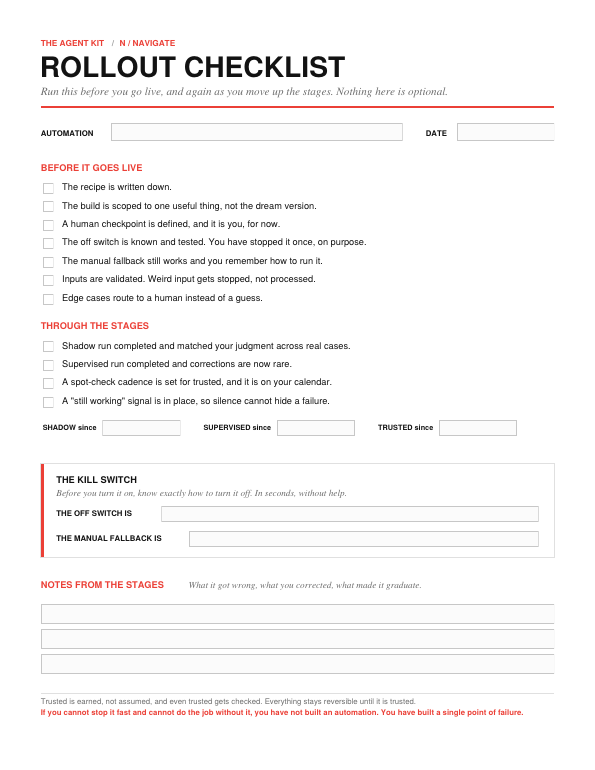
The worksheet: Rollout Checklist
Run this before you go live, and again as you move up the stages. Nothing here is optional, and the checklist is shortest to read and most expensive to skip. Before it goes live: the recipe is written down, the build is scoped to one useful thing, a human checkpoint is defined and it is you for now, the off switch is known and tested, the manual fallback still works, inputs are validated so weird input gets stopped not processed, and edge cases route to a human instead of a guess. Through the stages: shadow run completed and matched your judgment, supervised run completed and corrections are now rare, a spot-check cadence is on your calendar for trusted, and a "still working" signal is in place so silence cannot hide a failure.
What breaks, and how to handle it
Automations fail in a small number of predictable ways. Knowing them in advance is most of the protection.
| What breaks | What it looks like | How to handle it |
|---|---|---|
| The input changed | Someone edits a form or a format shifts, and the output goes subtly wrong. | Validate inputs. Have the build check that what it received looks right, and stop if it does not. |
| The edge case | An unusual item the build never saw, handled with confident nonsense. | Define what "unusual" looks like and route those to you, instead of letting it guess. |
| The silent failure | It stops running and nothing announces it. | Build a heartbeat. A weekly "still working" signal beats silence. Make no-news-is-good-news impossible. |
| Over-automation | You automated a judgment step and it made a confident wrong call. | Pull that decision back to a human checkpoint. Automate around the judgment, not through it. |
| The tool changed | An update underneath your build broke it. | Know what your build depends on. Expect occasional maintenance. This is the cost of owning it. |
The pre-mortem
The cheapest failure is the one you imagined before launch. Let an assistant try to break your plan on paper.
The pre-mortem
Plays skeptic, predicts how your automation fails in real use, and hands you a safeguard for each plus a staged rollout plan.
I am about to roll out an automation. Before I do, play devil's
advocate and help me find what could go wrong.

Here is what it does: [describe the trigger, the steps, the output,
and the checkpoint].

List the most likely ways this fails in real use, especially the quiet
ones I would not notice right away. For each, give me a simple
safeguard I can put in place before launch. Then give me a short
staged rollout plan to move it from shadow, to supervised, to trusted,
and tell me what I should see at each stage before moving on. Be
specific and skeptical.
When you are done
It runs, you trust it because it earned it, you can kill it in seconds, and you can still do the job by hand if you must.
Now there is one question left, the one the whole kit has been driving toward. Did it work, and can you prove it?
Take it into Track.
The AGENT Kit / T / Track
Prove it worked
Or learn fast that it did not.
The kit opened with a promise in four parts. Stop guessing. Find your real candidates. Build the few that move the needle. Prove it worked. You are at part four.
This is the part people treat as optional, and it is the part that separates a result from a feeling. Skip it and you are left with a vibe about whether the thing helped. A vibe is exactly what sent so many people to the wrong conclusion about AI in the first place. You are not going to guess here either.
Measure the thing you predicted
You do not invent a new metric now. You already chose it, back in Gauge, when you estimated Time Back and named the stakes. Track is where you check that estimate against what really happened.
That earlier number is your baseline, the cost of doing the task by hand. Without a before, you cannot prove an after. If you flipped to trusted without writing down what the manual version cost you, get that number now from your inventory, before it fades.
Three numbers, not thirty
Keep this light or you will not do it. Three numbers tell you almost everything.
- Time back, actual against estimated. You predicted hours saved per month. Are you getting them? Close counts. Wildly short does not.
- Quality. Is the output as good or better than the manual version, and how often does it need a human fix? A build that saves an hour and creates an hour of corrections saved you nothing.
- Adoption. Are you still using it, honestly? This is the truest number of the three. If you quietly drifted back to doing it by hand, the automation failed, no matter how clever it was. Your own behavior is the verdict.
The honest verdict
After a few weeks of trusted running, every automation gets one of three verdicts. Say it out loud.
- It worked. It returned the time, the quality holds, you still use it. Keep it, set a light spot-check, and go back to your Gauge shortlist for the next build. This is the loop, and it is the whole point.
- It half-worked. The returns are real but something nags, a checkpoint you cannot drop, an edge case that keeps surfacing. Fix the one thing, then measure again. Do not abandon a good build over a small leak.
- It did not work. Kill it, without shame. A build you killed after a weekend taught you more, for less, than a "transformation" you never measured. You learned something true about your business and your tools, cheaply. That is not failure. That is the method working. The people who decided "AI does not work for me" are the ones who never ran this step, and so never learned anything they could use.
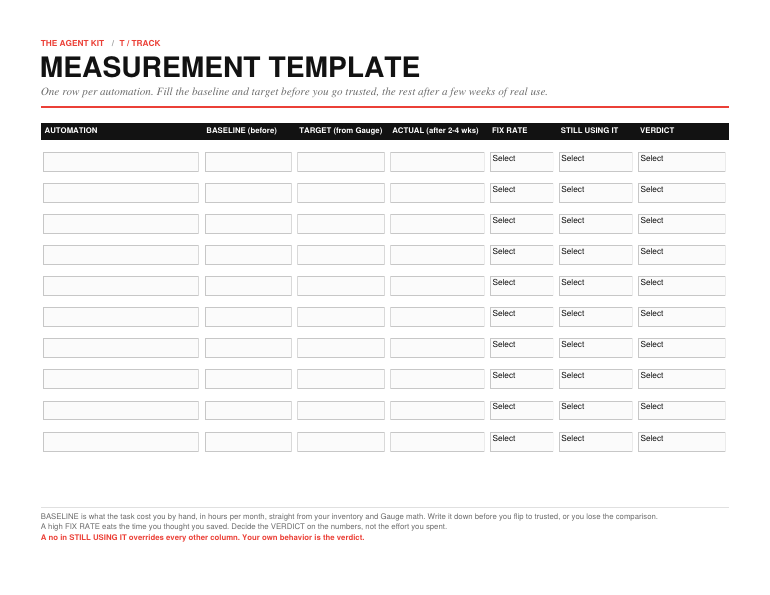
The worksheet: Measurement Template
One row per automation. Fill the baseline and target before you go trusted, the rest after a few weeks of real use. Baseline is what the task cost you by hand in hours per month, straight from your inventory and Gauge math. Target is the Time Back you predicted in Gauge. Actual is the measured time back after two to four weeks of trusted running. Fix Rate is how often the output needs a human correction, low, medium, or high, because a high fix rate eats the time you thought you saved. Still Using It is yes or no, honestly, and a no there overrides every other column. Verdict is Keep, Fix, or Kill, decided on the numbers, not the effort you spent.
The verdict check
It is hard to grade your own work fairly, especially after you put a weekend into it. Let an assistant hold the line.
The verdict check
Compares what you predicted to what happened and returns a clear Keep, Fix, or Kill, with the one thing to change or the one thing to carry forward.
Help me decide whether an automation earned its place. Be honest, not
encouraging.

Here is what I predicted it would save and why: [your Gauge estimate
and the stakes]. Here is what happened after a few weeks of real use:
[time saved, how often it needed fixing, whether I am still using it].

Compare what I predicted to what happened. Tell me whether this is a
Keep, a Fix, or a Kill, and why. If it is a Fix, name the single most
likely thing to change. If it is a Kill, tell me in one line what I
learned that is worth carrying to the next build.
Close the loop
When a build works, you are not done. You are warmed up. Go back to Gauge, take the next task off your Start Here list, and run it through Engineer, Navigate, and Track. The kit is a loop, not a read. Each turn through it is faster, because the thinking is now yours.
That is what you bought. Not five automations. The sequence that finds and ships the right one, again and again, as your business and the tools both keep changing.
The AGENT Kit / Close
Now you know where to start
What you just learned
You did not learn AI. You learned something that outlasts any tool.
You learned to see the work that drains you, rank it by what it pays, build the few that earn it, roll them out without breaking anything, and prove they worked. Audit, Gauge, Engineer, Navigate, Track. That sequence is the skill. The tools sitting underneath it will be different in a year. The sequence will not.
That is the part that lasts. The tools will keep changing, and you will know exactly how to bring each new one in, because you now hold the thing that matters most: a way to decide what to build first, on purpose.
You came in wanting to bring AI into your work. You leave knowing exactly where to point it first.
When to call someone
Some of what you found is not yours to build, and you already know which.
Look at your Prize pile, the high-value, high-effort builds you flagged. Look at any build that fought you for a third weekend. That is the line. When the cost of getting it wrong is higher than the cost of paying someone who has built it before, the smart move stops being do-it-yourself and becomes a hire. Naming that line is not giving up. It is the same call I would make sitting across from you.
If that is where you are, that is the work we do. BAMPT builds the high-stakes systems for businesses that have outgrown the weekend version, and we will tell you honestly when something is not worth handing off. When you have a Prize worth building right, come find us at bampt.co.
A last word
You picked this up wanting AI to earn its place in your business, and unsure where to begin. Now you have a way to find the right first build, and the next one, and the one after that. It was never about the tools. It was about the order, and the order is yours to set.
Start with the one that pays the most, prove it worked, and go again.
Go build the right thing first.
Chantal